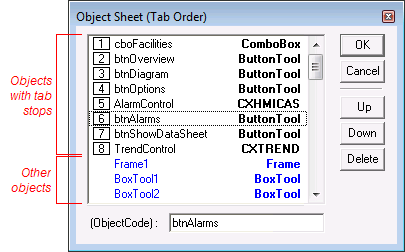
The Object Sheet (Layout menu, Objects option) shows a list of all objects on TheView. Its primary purpose is the adjustment of object tab order. Any object on TheView that is able to attain focus has a tab stop number, which is listed next to its Object Code on the Object Sheet. All other objects are listed in blue without numbers. The order of objects in the Object Sheet is not related to their layers or stack position on TheView.
The object listed as number 1 will have the focus when a screen is initialized. For example, if you have a set of three command buttons and want the first button to have the focus when the screen is run, position this button at the top of the object list. To reorder the list, select an item and click the Up or Down button.
If you select an item and click the Delete button, the object will be deleted from TheView.
You can also change an ObjectCode in the Object Sheet window. To do so, select the item and then type the new ID in the (ObjectCode) box.
|
|
| Objects Sheet |
|
|
|

